I "made" a web app (for myself)
Today, instead of working on my office deliverables, I made a web app using Adalo and Google Gemini.
I've been looking for a simple app that can help me a lot in making my travel blogs. At a press of a button, I want the app to take note of the time and date, then allow me to write a short note about where I am and what I'm doing. That's it. And, of course, it should allow me to see these notes in reverse chronological order.
That's all I want. No sign ups, no ads, no connectivity with other apps, no permissions.
After scouring the play store, I couldn't find one that fits my requirements. In a bout of insanity, I just typed in what I wanted into the google search bar.
The AI result was (unlike most times) helpful. A simple app like this, it said, could be made in a day by some Free programs like Adalo and Flutter. Because Adalo was the first link, I visited the page and signed up (the irony of making an account just so I can make an app that doesn't require making an account).
It's drag and drop app creation workspace was quite intuitive. I just had to ask Gemini for what terms to use and search for in order to get the results I wanted. After a morning of experiments, I soon had a working prototype of the app.
I introduce to you, Bazoop.
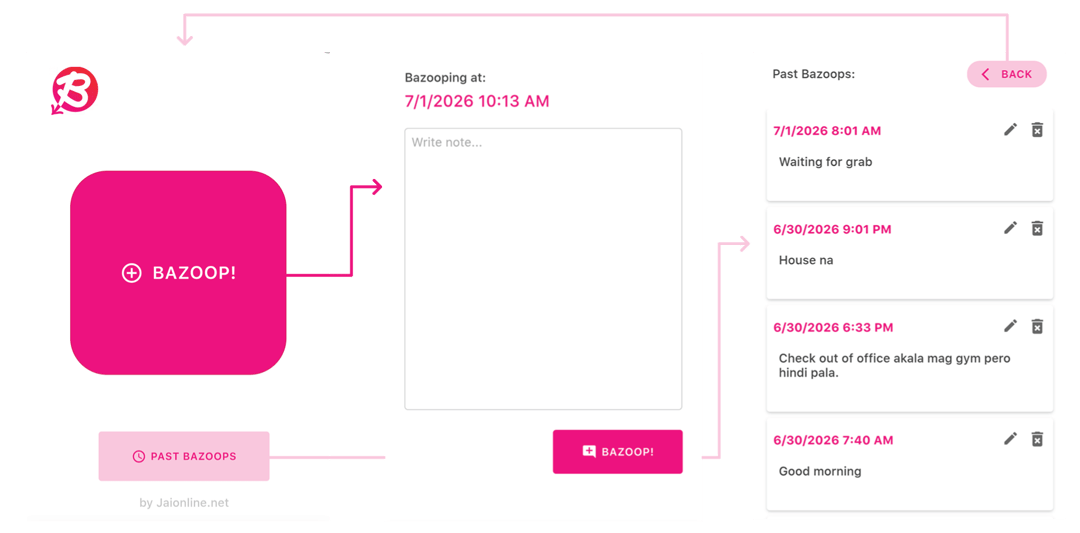
Upon opening the app, there is one big button for "Bazoop"-ing. When you press it, the time and date are automatically noted and you get to input some words. This is where I'll note down what I'm doing or where I am. My main use for this is to measure how long some activities take on my travels (or daily life). It's a marker for a specific point in time plus a few words to describe how I am present in it.
Upon saving the Bazoop, you're returned to the main page. Under the big Bazoop button is another button to see the Bazoop archive. The archive is just all the Bazoops listed, most recent on top. Here, you can delete bazoops (added an edit button a day after) or return to the main page.
And that's it. Simple and effective. All my requirements checked off.
Sadly, you need a paid subscription to Adalo in order to publish an app or get its APK. So I can't access this app when I'm offline. For now it's a web app that only works from my browser.
But still, it's something that I made. It's very basic but it's an app that could potentially make my life easier. I even made an icon for it and decked it out in my brand's colors lol.
Glad I was curious enough to try this. Time well spent, even if I'm the only one who appreciates it.
-jgzn
P.S.
I actually found an app on the play store that does essentially the same thing, and works offline. It has ads tho, but pretty unobtrusive. I guess my idea wasn't as groundbreaking as I thought. Haha.